Building a Local AI Rig in 2025
It has been roughly 20 years since I last cracked open a PC case to build a machine from scratch. Back then, we were worried about IDE cables and jumper pins; today, the stakes are a bit different. My goal this time wasn't just to browse the web—I wanted to run LLMs locally.
I was looking for a sandbox for toy projects and experimentation without the leash of a monthly subscription to OpenAI or Anthropic. More importantly, I wanted to "get into the weeds": fine-tuning models and understanding the hardware bottlenecks firsthand.
The "Sensible" Alternative
When building for AI, the primary gating factor is VRAM (GPU memory). To do anything meaningful, 16GB is the floor.
Now, a rational choice is a Mac Mini with 24GB+ of unified memory. It’s efficient, quiet, and fits in a desk drawer. But where’s the fun in being sensible? I wanted a machine that looked the part and gave me the flexibility to swap components when the next breakthrough hits.
The Build Specs
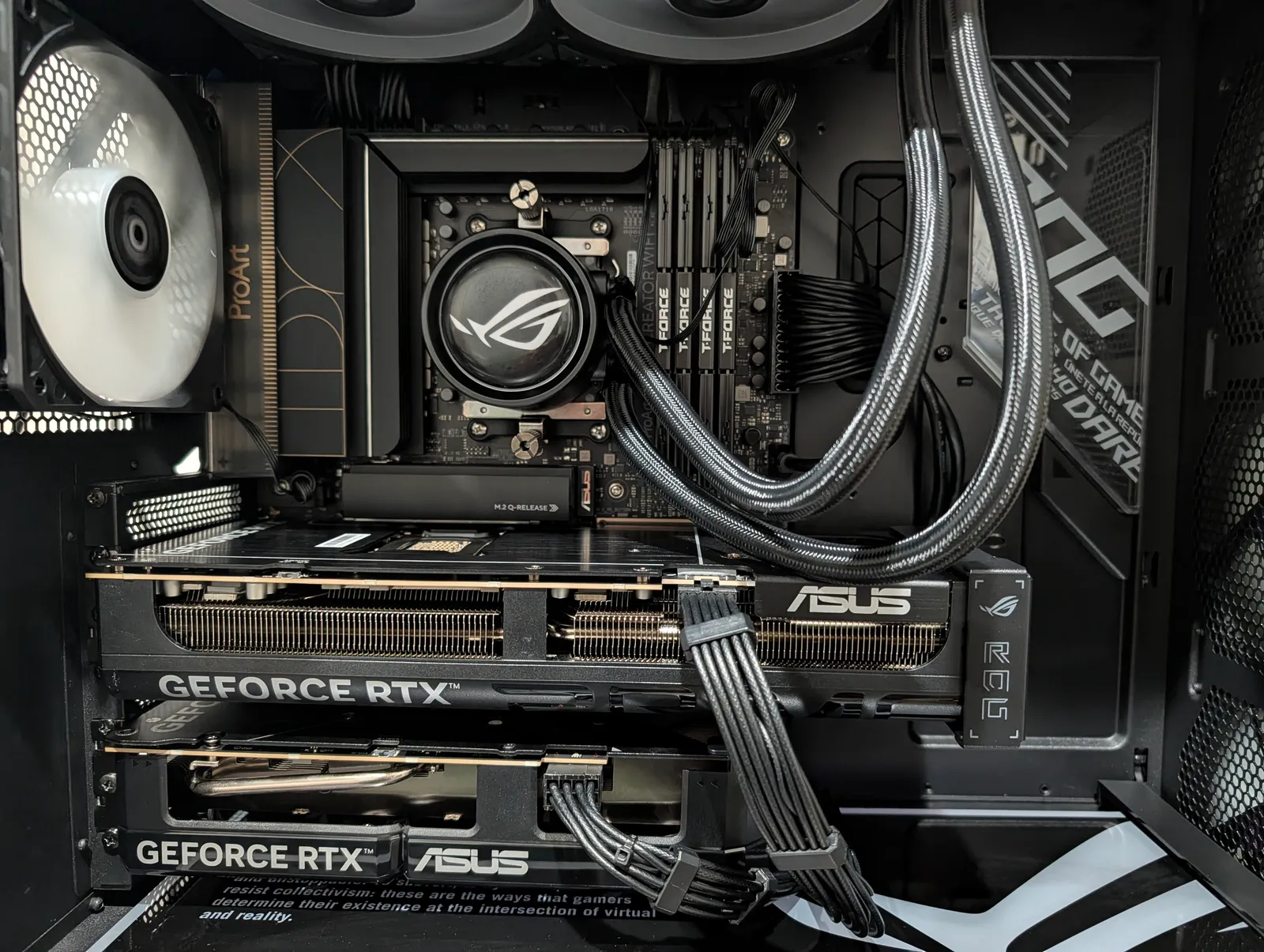
To support heavy local inference and future fine-tuning, I landed on a dual-GPU setup that prioritizes memory overhead and core count.
- GPU 1: NVIDIA RTX 5070 Ti (16GB)
- GPU 2: NVIDIA RTX 5060 Ti (16GB)
- CPU: AMD Ryzen 9 9950X3D
- Motherboard: Asus ProArt Creator X870E (Crucial for supporting dual GPUs at PCIe 5 x8/x8)
- RAM: 64GB DDR5
| Component | Role |
|---|---|
| Total VRAM | 32GB (Sufficient for medium-sized 70B parameter models) |
| Logic | The Ryzen 9 9950X3D provides the multi-threading needed to keep the GPUs fed. |
| Connectivity | The X870E chipset ensures the second GPU isn't throttled by a narrow data pipe. |
Why this "Frankenstein" Rig?
By pairing two 16GB cards, I’ve managed to bypass the massive "VRAM tax" associated with the ultra-high-end 5090s while still hitting a respectable 32GB of total VRAM.
The choice of the ProArt Creator X870E motherboard was a specific technical requirement. Most consumer boards choke the second PCIe slot down to x4 speeds or don't leave enough physical space to accommodate a full size graphic card; this setup ensures the data pipeline stays wide enough for serious workloads.
It feels good to be back in the BIOS. Now, if you’ll excuse me, I have some local weights to download and some fans to tune. Let the experimentation begin!